AI-Powered EHS & Facility Management Software

Safety, risk, compliance, environment, assets, space and emergency management in one app for every site, with AI that saves your team hours every week.

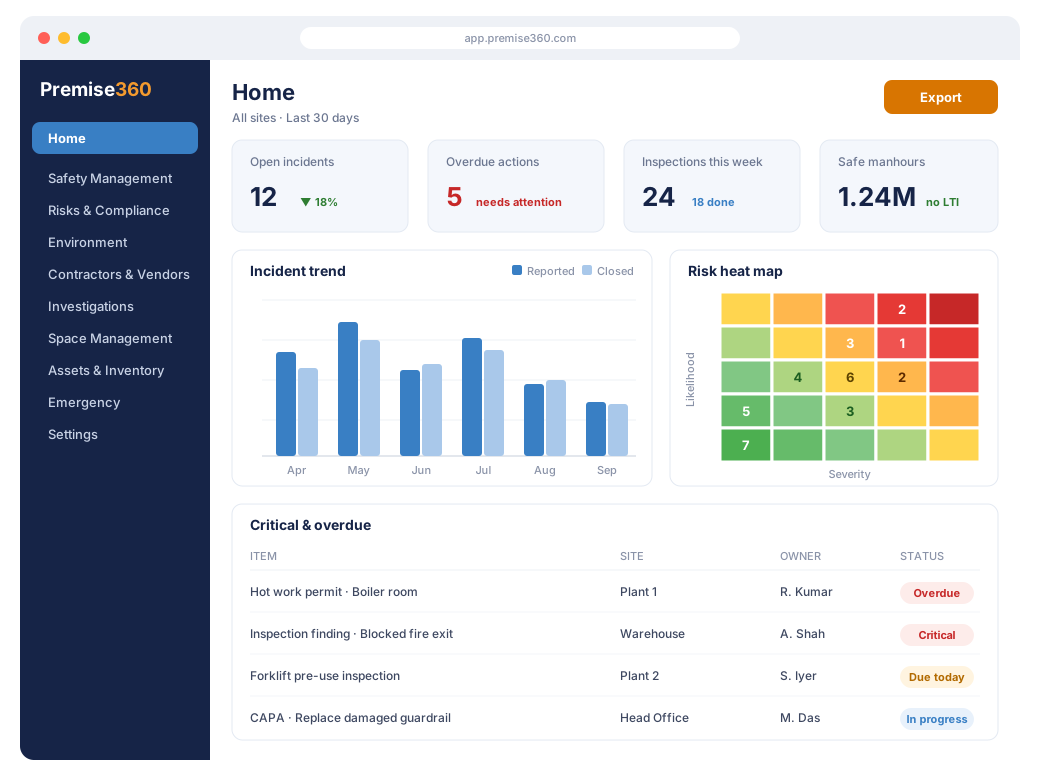
Premise360 Home dashboard with KPI tiles, incident trend, risk heat map and critical and overdue items

AI That Saves Time

AI spots hazards in photos, drafts records from a photo or document and reads meter readings, so teams spend less time typing.

One Platform, Every Site

Organisation, site and zone structure with role-based access and teams. Switch modules on per site and see everything rolled up on one dashboard.

Built for the Field

Installable app for phones, tablets and desktops. Report, inspect and attach photos and videos on the spot, with push and email notifications.

Workflows That Close the Loop

Configurable approval workflows with SLAs, RACI escalation matrices and reminders, so nothing stays open by accident.

Actions From Every Module

Findings from inspections, audits, observations, risks, injuries and more become tracked corrective and preventive actions (CAPA) with owners and due dates.

Reports in Excel, PDF & PPT

Export any module dashboard to Excel, PDF or PowerPoint, and bulk-import records from Excel or CSV.

Modules

Everything Your Sites Need, in One App

More than 45 modules across 9 areas. Switch on the ones you need for each site and give each team access to its own.

Safety Management

Capture incidents and observations from the field with photos and videos, run walk-through inspections, and track injuries, safety performance and workplace health. Every issue is prioritised, escalated and followed through to closure.

Risk & Compliance

Assess and control risk with a configurable risk matrix, run audits against ISO standards, control high-risk work and hazardous materials, and stay on top of every legal and regulatory obligation.

Environment & Sustainability

Bring environmental records, emissions, waste, utilities and regulatory consents into one place, and turn them into credible ESG and sustainability reporting.

People & Contractors

Keep your people trained and fit for work, hear their complaints and feedback, and make sure contractors and vendors meet your standards before and while they work for you.

Workforce, Projects & Documents

Plan shifts, track attendance and team performance, run projects and meeting actions, and keep important documents current, with AI that reads them for you.

Investigations & Reports

Find out what went wrong and why, drive corrective and preventive actions raised from every module, and keep a complete audit trail of every change.

Assets & Space

Know what you own and keep it running: assets, stock, maintenance, contracts and work orders. Plan floors, desks, rooms and moves so space is used well.

Emergency Preparedness

Be ready before something goes wrong, with emergency and continuity plans, regular drills, up-to-date emergency contacts and clear exit routes for every site.

Settings & Configuration

Shape Premise360 to the way you work, without code: sites, users and teams with role-based access, approval workflows with SLAs and escalation, your own checklists and templates, reminders, and a guided setup for every site and module.

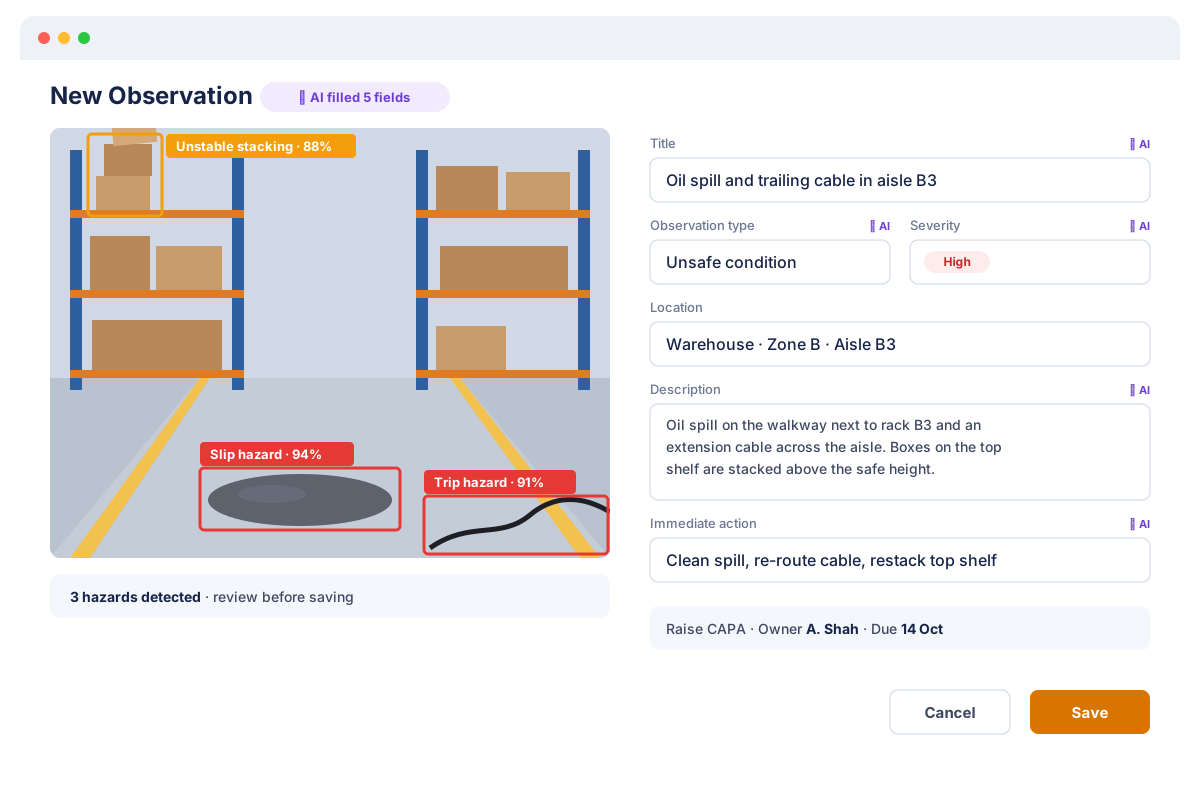
New observation in Premise360 where AI marks a slip hazard, a trip hazard and unstable stacking on the photo and fills in the form
AI built in

AI That Does the Reading and Typing

Premise360 uses AI where it saves the most time for safety and facility teams.

  • Photo and video hazard detection: highlights hazards on incident, observation and inspection photos.
  • AI quick-fill: creates a draft record from a photo or document for you to check.
  • Document AI: reads text and key fields from documents, compliance papers and meter photos.
  • AI Assistant: ask questions about your dashboards, switched on per organisation.
Standards

Ready for Audits and Disclosures

Premise360 keeps the evidence auditors and stakeholders ask for, so you are not chasing spreadsheets the week before an audit.

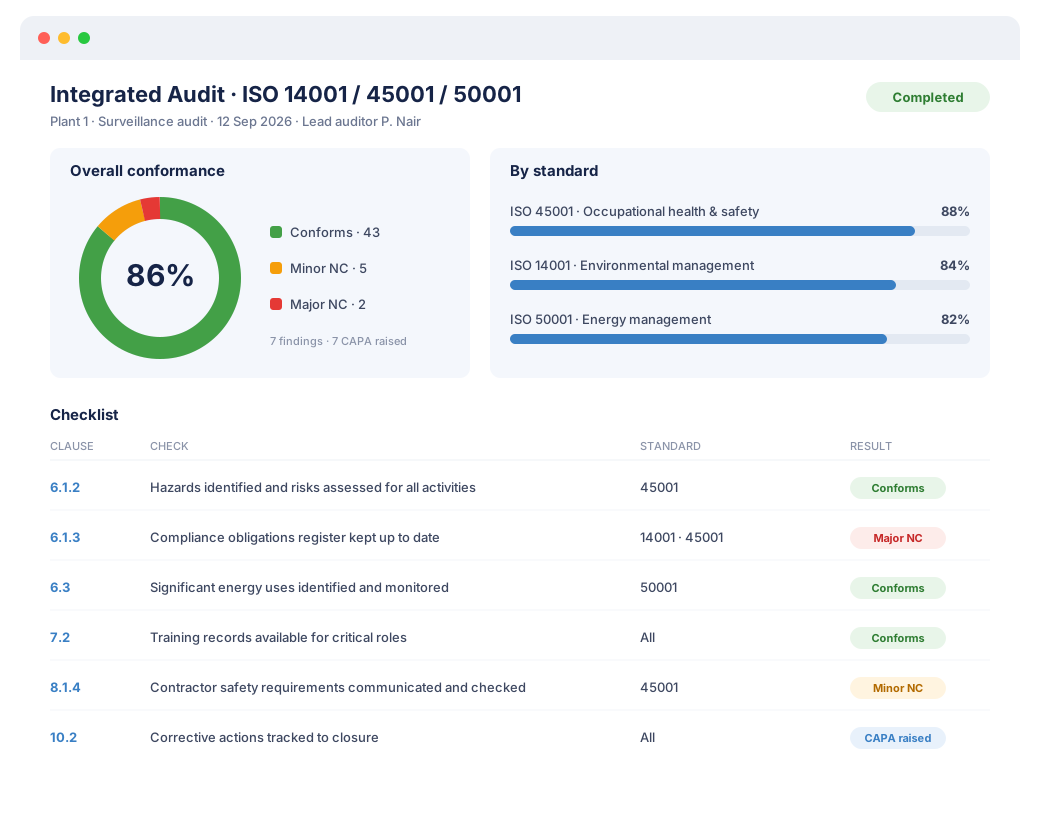
  • ISO 14001, ISO 45001 and ISO 50001 audit checklists, with integrated management system (IMS) audits and an audit programme.
  • TRIR and LTIFR safety rates and safe manhours from your own records.
  • Scope 1, 2 and 3 greenhouse gas emissions inventory.
  • GRI, CDP and TCFD ESG disclosure tracking.
  • Full history: audit log, investigation activity log and version-controlled consents.
Integrated ISO 14001, 45001 and 50001 audit in Premise360 with an 86% conformance score, results by standard and checklist findings

Why Choose Premise360

Replace a stack of spreadsheets, paper forms and single-purpose tools with one platform your whole site actually uses.

All-in-One

Safety, environment, assets, space and emergency on one platform, with one login and one dashboard.

Configurable, Not Custom-Coded

Workflows, checklists, the risk matrix, permit formats and reminders are settings your admins change themselves.

Nothing Slips

Push and email notifications, scheduled reminders, SLA warnings and escalations keep every item moving to closure.

Insight at a Glance

Home dashboard with KPIs, a risk heat map, critical and overdue items by site, trends and a calendar of what is due.

Secure by Design

Encrypted connections, role- and site-based access, separate data for each organisation, captcha and account lockout.

Quick to Roll Out

Guided setup, built-in standard checklists and Excel import get a new site live without a long project.

Getting started

Live in Four Steps

1

Add Your Sites

Create your sites and zones, and optionally upload a site layout.

2

Choose Modules

Switch on the modules each site needs.

3

Invite Your Teams

Add users one by one or from Excel, and group them into teams with module access.

4

Configure & Go

A guided setup walks each module through its workflows, checklists and reminders.

What Our Customers Say

S. Ramachandran

“Premise360 is a perfect premise safety and asset management software that we were looking for!”

S. Ramachandran

Chairman, Large Co-op Society

FAQ

Frequently Asked Questions

What is Premise360?

Premise360 is an AI-powered environment, health and safety (EHS) and facility management platform. It brings incident and alert management, inspections, risk and compliance, environment and ESG, contractors, workforce, investigations and CAPA, space, assets and emergency preparedness into one web and mobile app, with AI built in.

Who is Premise360 for?

Organisations that run physical sites: factories and plants, warehouses, offices and campuses, residential societies and facility management teams. EHS managers, site and facility managers, supervisors and frontline staff each get the screens their role needs.

Do we have to use every module?

No. Premise360 has more than 45 modules across 9 areas. You switch on only the ones you need, site by site, and give each team access to its own modules. You can add more later without losing data.

Which standards and frameworks does Premise360 support?

Premise360 includes built-in audit checklists for ISO 14001, ISO 45001 and ISO 50001, including integrated management system audits. It calculates TRIR and LTIFR safety rates, keeps a Scope 1, 2 and 3 greenhouse gas emissions inventory and tracks ESG disclosures for GRI, CDP and TCFD.

Is there a mobile app?

Yes. Premise360 is an installable web app that works on Android phones, iPhones, tablets and desktops. Field teams can report incidents, complete inspections and attach photos and videos straight from their phone, and receive push notifications.

Can we configure Premise360 to our processes?

Yes, without code. Administrators configure approval workflows with SLAs and escalation, the risk matrix, inspection, audit and assessment checklists, permit formats, reminder schedules, response protocols and register formats. A guided setup walks each new site and module through the settings it needs.

How is our data kept secure?

Premise360 runs in the cloud over encrypted HTTPS connections. Each organisation's data is kept separate, access depends on role and site, passwords are stored hashed, and sign-in is protected by a captcha and account lockout. See our privacy policy for details.

How do we get started and what does it cost?

Email info@nxtechworks.com for a demo. Pricing depends on the modules and number of sites you need. Once you subscribe, a guided setup helps you add sites, zones, users and teams and configure each module.

See Premise360 on Your Own Sites

Tell us which sites and modules you are interested in and we will set up a demo around them.

Request a Demo